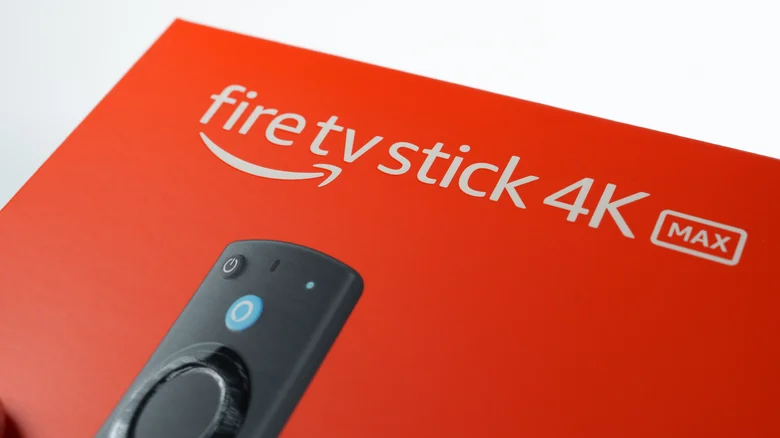
The Amazon Fire TV Stick 4K Max stands out as the most powerful version of Amazon’s popular streaming dongle, delivering premium performance in a tiny package that plugs directly into any TV’s HDMI port. With sharper 4K visuals, faster navigation, and expanded capabilities like cloud gaming, it transforms older televisions into smart entertainment hubs without breaking the bank. Current promotions and trade-in options make upgrading from older models even more appealing.
This latest iteration builds on years of refinement, packing significant hardware upgrades into the same compact form factor. Whether replacing a sluggish Lite or HD Stick, or jumping in for the first time, the 4K Max offers noticeable improvements in speed, picture quality, and smart features that elevate everyday streaming.
Key Hardware Upgrades
The Fire TV Stick 4K Max doubles down on performance with 2GB of RAM — twice what the base 4K models offer — for smoother app switching, quicker menu scrolling, and less buffering during heavy use. Its 16GB of internal storage provides ample space for apps, games, and cached content, compared to just 8GB on previous generations.
Wi-Fi 6E connectivity ensures rock-solid wireless performance, even in crowded networks, with lower latency ideal for gaming and 4K streams. The included Alexa Voice Remote features hands-free operation, dedicated shortcut buttons for popular services, and improved IR blaster range for controlling your TV’s power and volume directly.
Superior Video and Audio Quality
True to its name, the 4K Max streams Ultra HD content at four times the resolution of standard HD, supporting advanced formats like Dolby Vision, HDR10+, and HLG for vibrant colors, deeper blacks, and stunning contrast on compatible TVs. Dolby Atmos audio processing creates immersive, three-dimensional sound through compatible soundbars or receivers.
These formats shine with services like Netflix, Prime Video, Disney+, and Apple TV+, where high-bitrate 4K content looks cinematic. Even standard HD shows benefit from upscaling algorithms that sharpen details and reduce compression artifacts, making older content feel refreshed.
Alexa-Powered Smart Features
Amazon’s voice assistant integration goes beyond basic search, understanding natural language queries like “Show me action movies from the 90s” or “Play relaxing jazz on Pandora.” The smarter search algorithm surfaces personalized recommendations across multiple services, saving time over manual browsing.
Hands-free Alexa lets you control playback, adjust volume, or launch apps without reaching for the remote. Ambient Experience mode turns the screen into a digital photo frame or ambient artwork generator when idle, while Picture-in-Picture keeps sports scores or news visible during other content.
Xbox Cloud Gaming and App Performance
One of the biggest surprises is Xbox Game Pass Ultimate support, streaming AAA titles like Starfield, Forza Horizon, and Halo directly to your TV without a console. The 2GB RAM and Wi-Fi 6E handle demanding games smoothly at 1080p/60fps, though you’ll need a compatible Bluetooth controller.
App performance benefits across the board: Netflix loads episodes instantly, YouTube handles 4K live streams without stutter, and Prime Video’s X-Ray feature pops up instantly during movies. Even less-optimized apps run noticeably faster than on previous Sticks.
Fire TV Stick Model Comparison
| Model | Resolution | RAM/Storage | Wi-Fi | Best For |
|---|---|---|---|---|
| Fire TV Stick Lite | HD | 1GB/8GB | Wi-Fi 5 | Basic streaming on older TVs |
| Fire TV Stick HD | HD | 2GB/8GB | Wi-Fi 5 | Improved speed for HD content |
| Fire TV Stick 4K | 4K + HDR | 2GB/8GB | Wi-Fi 6 | 4K streaming without extras |
| Fire TV Stick 4K Max | 4K + Dolby Vision/Atmos | 2GB/16GB | Wi-Fi 6E | Premium performance, gaming |
Trade-In Program Benefits
Amazon’s device trade-in sweetens the deal significantly. Eligible old Fire TV Sticks (Lite, HD, or International versions) qualify for instant discounts up to $3 off plus a gift card worth 20% of the new purchase price. Echo Dots and other unused Amazon gadgets also participate, stacking savings on top of frequent sales.
The process is simple: select your trade-in device during checkout, get an instant quote, and ship your old unit using the provided free label after receiving your new Stick. This makes upgrading essentially risk-free while clearing closet clutter.
Setup and Compatibility Requirements
Getting started takes minutes: plug into any TV’s HDMI port (HDMI extender included for tight spaces), connect to Wi-Fi, and sign into your Amazon account. The device auto-detects your TV remote codes for power/volume control.
It works with virtually all modern TVs from 2015 onward, including smart TVs you’d use to replace the built-in software. No internet subscription required beyond standard streaming services — basic setup completes offline. Regular firmware updates add features and security automatically.
Real-World Performance Wins
Users upgrading from older Sticks notice immediate differences: home screens load twice as fast, 4K Netflix trailers play without hiccups, and multi-app workflows feel fluid. Gaming demos convince skeptics, with Forza Motorsport delivering console-quality visuals over Wi-Fi.
For households with multiple users, personalized profiles keep watchlists separate while shared Alexa skills handle group commands. The low power draw means it stays cool during marathon sessions, and the magnetic remote holder keeps everything tidy.
When to Skip or Consider Alternatives
The 4K Max shines brightest replacing HD/Lite Sticks or enhancing older smart TVs. If your current TV lacks HDMI or you prefer Google TV’s interface, Roku or Chromecast might suit better. Apple TV excels in AirPlay ecosystems but costs significantly more.
For pure streaming without ads or Amazon integration, dedicated media players exist. However, the 4K Max’s balance of price, power, and ecosystem makes it the top plug-and-play choice for most living rooms.