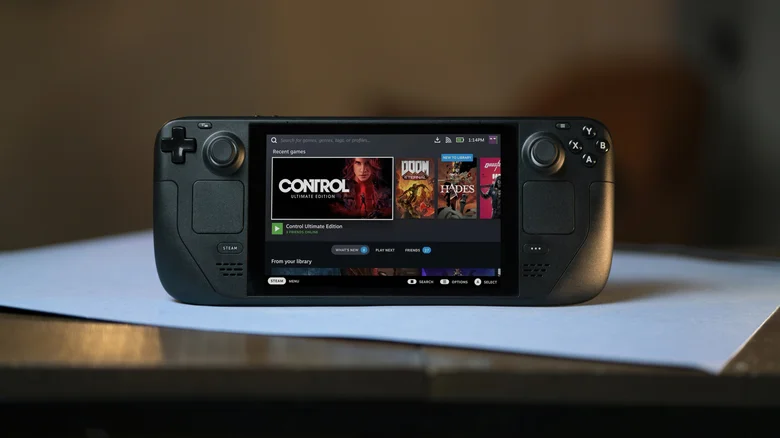
The Steam Deck transcends gaming handheld status through its full Linux foundation, unlocking a surprising range of practical applications from portable computing to creative production. Desktop Mode reveals the true power of this APU-powered device, transforming it into a versatile pocket PC capable of media playback, music creation, server hosting, and even experimental hardware projects. While battery life and ergonomics limit some uses, the Deck’s raw capability consistently exceeds expectations for non-gaming tasks.
Accessing these capabilities starts with switching to Desktop Mode: hold the Steam button, navigate to Power, then select Switch to Desktop. This reveals a complete KDE Plasma environment with the Discover app store (blue shopping bag icon) as your gateway to thousands of Linux applications. Most software installs with one click, leveraging Flatpak for universal compatibility across distributions.
Broken Deck To Mini PC Revival
A damaged Steam Deck isn’t scrap — it’s a viable mini PC project. Strip away non-essentials, leaving just the motherboard, then connect via USB-C dock to any monitor, keyboard, and input device. The result mirrors a full Deck experience for web browsing, light productivity, and media consumption without touching the gaming OS.
This approach inspired Valve’s upcoming Steam Machine — a living room mini PC running SteamOS with six times the Deck’s processing power. Early reports suggest VR capability for basic titles, positioning it as a console killer rather than handheld successor. Broken Decks fetch $200+ on secondary markets, making the project viable for tinkerers with spare docks.
Remote Hardware Control Systems
Military applications highlight the Deck’s controller inputs and Linux flexibility. Systems like Ukraine’s ShaBlya mount machine guns on stabilized turrets with thermal cameras, using custom Deck software for aiming, firing, and video feeds. Joysticks handle precise pan-tilt, while trackpads manage zoom and overlays.
Similar DIY projects control RC vehicles, security cameras, or industrial robots. GPIO pins (with minor hardware mods) enable direct sensor integration, turning the Deck into an embedded controller for maker projects or automation rigs.
Cyberdeck Mods And Portable Terminals
Channeling Neuromancer’s iconic cyberdecks, modders gut the Deck’s screen and grips, installing compact keyboards like Apple’s Magic model. Paired with AR glasses for display, the result resembles a futuristic terminal perfect for coding, SSH sessions, or command-line workflows on the go.
No software changes needed — Bluetooth controllers restore gaming instantly. These “Bento Box” builds prioritize portability over native controls, ideal for sysadmins, developers, or anyone romanticizing 80s cyberpunk aesthetics while running modern Linux tools.
LAN Servers And Hosting
Hosting a Minecraft Java server for 4-6 players takes minutes via Docker images from Discover. Allocate 4-6GB RAM, configure port forwarding, and disable sleep mode (Settings > Power) to keep sessions alive. The Deck handles dozens of concurrent players for lighter games like Valheim or Terraria.
Other servers shine too: Plex transcoding for media libraries, Nextcloud for personal cloud storage, or even lightweight web hosts. Ethernet via dock ensures stability, while Wi-Fi suffices for casual LAN parties.
Media Consumption And E-Reading
VLC from Discover plays virtually every format locally from microSD cards, delivering 5+ hours of 1080p playback. Stream Plex or Jellyfin libraries remotely for home theater duties via HDMI dock — browser handles Netflix/Disney+ despite lacking native apps.
E-reading works decently with KOReader or Calibre. Manga apps like Komikku offer panel-by-panel navigation in portrait mode. Resolution limitations affect tiny fonts, but 1200×800 suffices for novels and webcomics compared to early PDAs.
Music Production On The Go
Major DAWs run natively: Bitwig, Reaper, and LMMS deliver full studios with VST support. Touchscreen excels for pads and mixers; trackpads substitute mice effectively. USB-C audio interfaces (post-BIOS tweak) enable mic/guitar recording.
VCV Rack turns the Deck into a modular synth playground. Live performance setups pipe audio to Bluetooth speakers, making it viable for busking or impromptu sets. Proton handles some macOS tools if Linux versions lag.
Full Portable Workstation
Dock the Deck with monitor/keyboard/mouse for Linux desktop replacement. LibreOffice, GIMP, and VS Code run smoothly for productivity. Battery lasts 2-3 hours unplugged; always dock for extended use.
Distros via Distrobox virtualize Debian/Ubuntu environments seamlessly, accessing .deb packages without host conflicts. Perfect for developers testing cross-distro compatibility or running legacy tools.
VRChat And Social VR (Desktop Mode)
VRChat launches in 2D desktop mode flawlessly, supporting virtual hangouts without headsets. SteamVR runs basic streaming to external headsets, though frame rates stutter on demanding titles like Beat Saber.
Upcoming Steam Machine promises native VR performance, rendering dual-eye views at console quality.
Multi-Distro Linux Playground
Distrobox creates isolated Ubuntu/Fedora/Arch environments sharing Deck hardware directly. Install distro-specific packages, run GUI apps natively, access USB devices — ideal for testing, development, or curiosity.
Run seven distros simultaneously if RAM allows, switching contexts instantly. No dual-boot hassles or repartitioning risks.
Why Skip Windows Installation
Dual-booting Windows destroys SteamOS optimizations: sleep/resume fails, battery drains 2x faster, touchscreen/trackpad support vanishes. Anti-cheat games (Fortnite) need it, but Heroic Launcher/Proton handle most titles. Windows updates routinely break Steam; Steam updates break Windows. Native SteamOS outperforms handhelds running Windows despite weaker specs.
The Deck thrives as a Linux-first device — embrace Desktop Mode’s power rather than fighting Microsoft’s ecosystem.