Not all HDMI ports deliver identical performance when connecting Roku streaming devices, as varying standards profoundly impact 4K/HDR quality, audio return capabilities, and future-proofing across modern televisions. While Roku functions universally via HDMI, optimal picture fidelity, immersive soundbars, and advanced features like Dolby Vision demand specific port selection—HDMI 2.0/2.1 with HDCP 2.2 support—elevating casual streaming into cinematic excellence. Labels guide choices, but understanding protocols unlocks superior setups effortlessly.
HDMI Standards Explained
HDMI 2.0 powers mainstream 4K@60Hz with HDR10/Dolby Vision, ARC audio passthrough, and 18Gbps bandwidth—Roku Streaming Stick 4K’s sweet spot. HDMI 2.1 leaps to 4K@120Hz, 8K@60Hz, VRR (variable refresh rates eliminating tearing), ALLM (auto low-latency for gaming), and eARC doubling audio bandwidth for lossless Dolby Atmos.
HDCP 2.2 mandates copy protection for 4K/HDR streams—absent ports blackscreen protected content like Netflix Ultra HD. TVs scatter capabilities unevenly: Port 1 might claim HDMI 2.1 sans VRR; Port 3 enables full spec. Manuals specify; test via Roku’s 4K detection menu.
Optimal Roku Port Selection
Prioritize highest-spec HDMI 2.1 for Roku Ultra/Streambar—unlocks 4K120 gaming via cloud, buttery Apple TV+ playback. Secondary devices tolerate 2.0b; primary streamers demand peak bandwidth. Enable CEC (Consumer Electronics Control) via Settings > System > Control other devices for unified remotes controlling TV/soundbar/Roku seamlessly.
Roku Express/Streaming Stick suffice on legacy 1.4, but 4K models stutter sans 2.0+. Verify via Roku display info—mismatched ports report “HDMI not supported.”
ARC/eARC Mastery for Audio
ARC (Audio Return Channel) pipes TV/Roku sound to soundbars via single HDMI, eliminating optical clutter—essential for Roku TVs lacking audio outs. eARC expands to uncompressed Atmos/DTS:X, 37Mbps versus ARC’s 1Mbps.
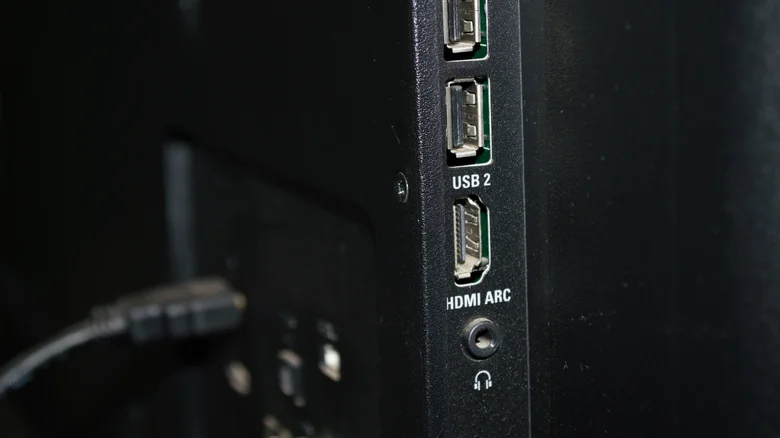
Labelled “HDMI ARC” ports auto-switch inputs; enable via TV audio settings. Roku sidesteps direct ARC needs—TV handles passthrough—but surround systems thrive connected thusly. Apple TV quirks demand ARC; Roku proves resilient.
Multi-port TVs vary: Samsung labels eARC explicitly; LG scatters ARC across 2-3. Soundbar first—Roku second—prevents handshake failures.
Cable Quality Imperative
Premium High-Speed cables (18Gbps) suffice HDMI 2.0; Ultra High-Speed (48Gbps) unlocks 2.1 fully. Roku Express bundles suffice basic HD; upgrade for 4K/HDR vibrancy. Cheap wires throttle bandwidth, manifesting stutter/black screens.
48Gbps actives embed chips verifying spec; test via bandwidth charts online. Length limits: 2m optimal 2.1; 5m caps 2.0.
Troubleshooting and Best Practices
Wrong port symptoms: no HDR badge, audio dropouts, 1080p fallback. Cycle inputs; power cycle chain (unplug 2min). Firmware mismatches plague—update TV/Roku promptly.
Future-proof: seek “HDMI 2.1b FRL” (fixed-rate link) avoiding “fake” ports advertising spec sans features. Gaming Roku? VRR/ALLM ports slash latency.
Port mapping ritual: label inputs (Soundbar: ARC3; Roku: HDMI2.1); photo backs for posterity. Ecosystem harmony follows precision—Roku elevates from plug-in to powerhouse via informed connectivity.