

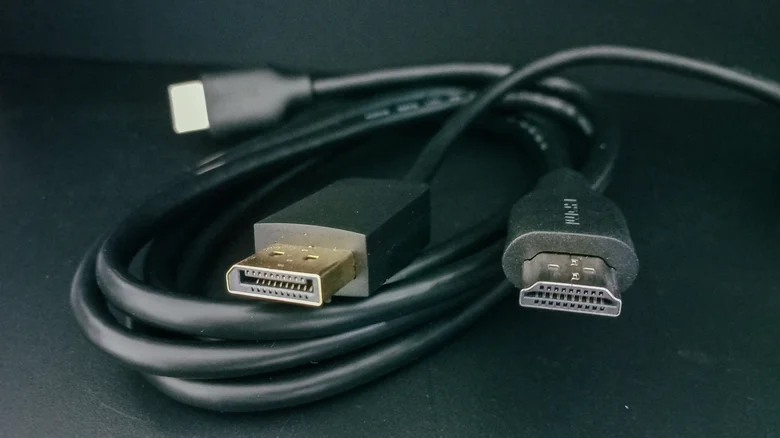
The High-Definition Multimedia Interface, or HDMI, stands as one of the most significant technological unifiers in modern home entertainment. For over two decades, it has progressively eliminated the clutter of analog cables, consolidating high-fidelity audio and video into a single, elegant digital connection. This evolution has been marked by a series of iterative standards, each expanding the boundaries of what is possible. The arrival of HDMI 2.1 represents a particularly substantial leap forward, introducing capabilities that fully unlock the potential of cutting-edge gaming consoles, high-frame-rate media, and advanced home theater systems. However, to truly harness these new features, the cable itself becomes a critical component. Using an older HDMI cable with new HDMI 2.1 equipment is like fueling a high-performance sports car with low-grade gasoline; the system will operate, but it cannot achieve its designed performance. Understanding the specifications, identifying the correct cables, and properly integrating them into your setup are essential steps for anyone looking to experience the pinnacle of digital audiovisual quality.
The HDMI 2.1 Standard: A New Benchmark for Performance
Introduced in 2017, the HDMI 2.1 specification was designed to address the exploding data demands of emerging display and audio technologies. Its most celebrated feature is support for 4K resolution at a blistering 120Hz refresh rate, a combination that delivers incredibly smooth motion crucial for fast-paced video games and high-frame-rate video content. Beyond raw resolution and speed, HDMI 2.1 introduces a suite of gaming-focused enhancements. Variable Refresh Rate (VRR) synchronizes the display’s refresh rate with the graphics source’s frame output, eliminating screen tearing and stutter. Quick Frame Transport (QFT) reduces latency for more responsive gameplay, while Auto Low Latency Mode (ALLM) allows a compatible TV to automatically switch to a game-optimized picture setting. On the audio side, Enhanced Audio Return Channel (eARC) supports the highest-quality, uncompressed audio formats like Dolby TrueHD and DTS-HD Master Audio, enabling a seamless, high-bandwidth connection between a TV and a premium soundbar or AV receiver. These features collectively require a massive increase in data bandwidth, which HDMI 2.1 cables are specifically engineered to handle.
Identifying Certified HDMI 2.1 Cables: Look for the Label
With the market flooded with cables of varying ages and capabilities, identifying a true HDMI 2.1 cable is paramount. The most reliable method is to look for official certification logos. The HDMI Licensing Administrator introduced the “Ultra High Speed HDMI” certification to eliminate confusion. Any cable bearing this official label has been rigorously tested to meet the full 48 gigabits per second (Gbps) bandwidth requirement of the HDMI 2.1 specification. This certification is your guarantee that the cable can handle 4K/120Hz, 8K/60Hz, and all associated features without signal degradation. As a helpful shorthand on product pages, you can also look for the “48Gbps” notation. It is important to be skeptical of marketing terms like “8K Ready” or “HDMI 2.1 Compatible,” which are not official certifications and may indicate a cable that does not meet the full bandwidth standard. Prioritizing a certified Ultra High Speed HDMI cable ensures compatibility and performance, and fortunately, these cables are now widely available at very accessible price points from reputable brands.
Integrating Cables into Your Home Theater Ecosystem
Acquiring the correct cable is only half the equation; proper integration into your system is equally important. First, you must audit your equipment. Identify which devices require HDMI 2.1’s advanced features. A PlayStation 5 or Xbox Series X console is a primary candidate, as is a modern gaming PC with a capable graphics card. Your display must also have at least one HDMI 2.1 port to receive the signal. It is crucial to consult your TV’s manual, as some models only enable the full 2.1 feature set on one or two specific ports, often labeled for use with gaming or eARC. If you are using an AV receiver or soundbar as a hub, ensure it also has HDMI 2.1 pass-through support on the relevant inputs and outputs to avoid creating a bottleneck in your signal chain. For the simplest and most reliable audio setup using eARC, connect your primary media device directly to your TV’s HDMI 2.1 port, and then use the TV’s eARC port (which is also HDMI 2.1) to send audio to your sound system. This method often preserves the best video features while ensuring pristine audio quality.
Achieving Optimal Setup and Future-Proofing
Once you have the certified cables and have mapped your connections, a few best practices will ensure optimal performance. Avoid bending cables sharply around corners, as this can damage internal conductors. If a cable run needs to be longer than 10 feet, consider investing in a certified active or fiber-optic HDMI cable, as passive copper cables can suffer signal degradation over longer distances. While HDMI is backward compatible—a new Ultra High Speed cable will work with an older HDMI 2.0 port—you will only gain the benefits of 2.1 when both the source device and the display support it. Investing in these cables today is also an act of future-proofing. As 8K content becomes more prevalent and refresh rates continue to climb, an Ultra High Speed HDMI cable purchased now will remain capable for years to come. By demystifying the specifications and focusing on certified products, you can confidently build a home entertainment system that delivers every pixel of detail, every frame of smooth motion, and every note of immersive sound exactly as the content creators intended.


