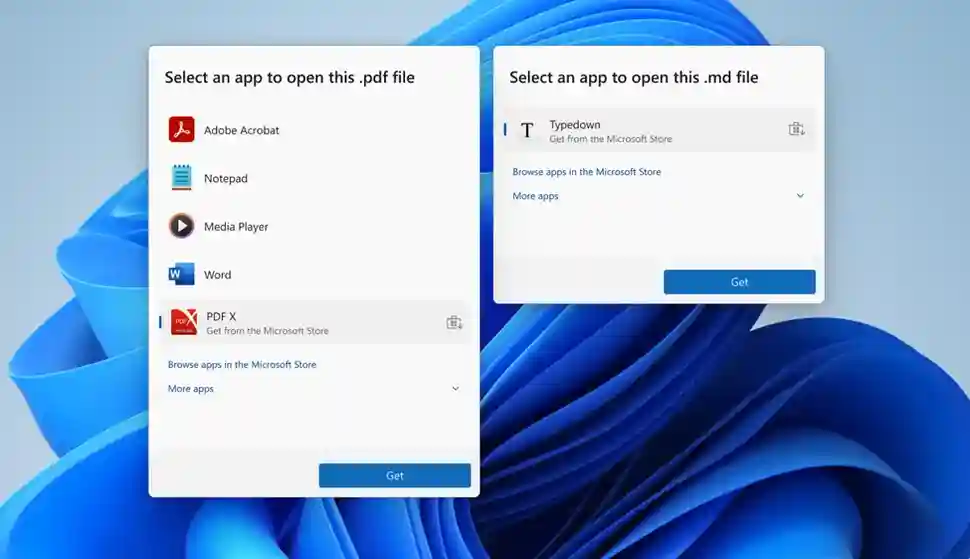
Windows 11 Insider Preview Build 26220.7344 introduces Microsoft Store app recommendations directly in the “Open With” dialog for files lacking default associations or unknown extensions, eliminating separate Store navigation. The feature surfaces relevant apps inline—PDF readers for .pdf, image editors for .png—streamlining installation from discovery. Rolling out gradually to Dev/Beta Channel Insiders, it complements Unified Update Orchestrator Platform for OS-managed app updates.[web:55]
Previously, “Open With” prompted manual Store browsing; new integration displays 3-5 contextually matched apps with one-tap install. No toggle confirmed for disabling recommendations, though privacy controls may emerge in stable release. Beta Channel rollout prioritizes Canary/Dev testers before 24H2 general availability Q1 2026.
New Open With Workflow
Right-click unknown file > Open With: native apps first, followed by Store recommendations ranked by extension compatibility and ratings. Install triggers UWP sideload with progress overlay, launching post-completion. Supports PWAs, Win32 bridges, and traditional UWP apps.
Accessing the Preview Feature
- Join Beta Channel: Settings > Windows Update > Windows Insider Program > Beta (safer than Dev).
- Install Build 26220.7344+: Settings > Windows Update > Download and install (gradual rollout).
- Test: download sample.pdf/.png/.zip > right-click > Open With > observe Store apps inline.
- Disable (if available): Settings > Privacy & security > General > App suggestions (monitor 24H2).
- Feedback: Feedback Hub > Desktop Environment > Open With (report false positives).
File Association Improvements Comparison
| Version | Open With | Store Integration | Install Speed |
|---|---|---|---|
| Windows 10 | Native only | Separate link | Manual Store |
| Windows 11 (Pre) | Native + link | “See more apps” | 2-3 taps + Store |
| Build 26220 | Native + Inline Store | 1-tap install | Seamless |
Unified Update Orchestrator Synergy
UOP APIs enable post-install auto-updates via Windows Update infrastructure, reducing Store dependency. Developers integrate UpdateOrchestrator namespace for idle-time patching, preserving delta compression benefits. Settings > App updates page consolidates manual scans across UOP/Store/Win32 apps.
Developer preview: NuGet UpdateOrchestrator 1.0; manifests specify compatibility matrices. Enterprise Intune policies govern sideload approvals.
Privacy and Control Considerations
Recommendations leverage file signature analysis—no content scanning. Edge cases: ambiguous extensions (.txt opened by 47 apps) prioritize ratings/downloads. False positives possible during rollout; feedback channels active.
Disable path speculation: Privacy Dashboard > App suggestions toggle (24H2). Enterprise Group Policy forthcoming for sideload whitelisting.
Developer Integration Roadmap
- Manifest registration: AppInstaller URI schemes auto-associate extensions.
- Store submission: automatic Open With eligibility via declared MIME types.
- PWA support: manifest.json declares file_handlers for inline recommendations.
- Win32 bridge: MSIX packaging enables UOP updates post-sideload.
Inline recommendations address decade-long UX friction, positioning Windows 11 as seamless app discovery platform. UOP integration creates closed-loop experience—from unknown file to updated app in three clicks—rivaling macOS Launch Services while preserving Android sideloading flexibility.