

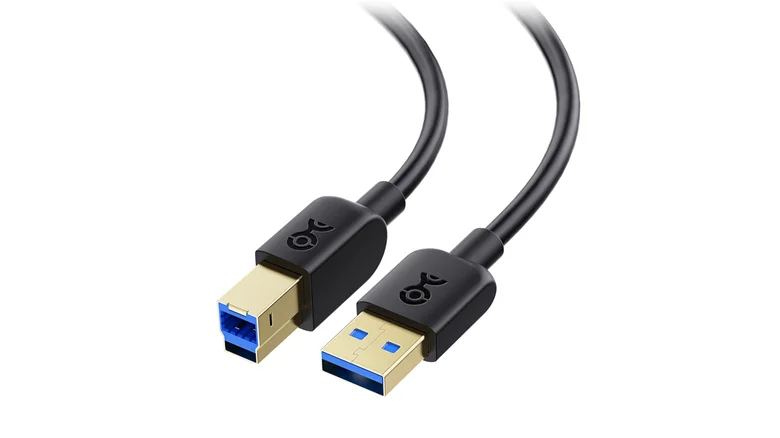
Understanding USB-A, USB-B, and USB-C: Key Differences Explained
The USB standard has evolved significantly since its inception in the mid-1990s, branching into multiple connector types designed for different use cases. USB-A, USB-B, and USB-C are the most common, each with distinct physical designs, capabilities, and applications. Knowing these differences can help you select the right cables and devices for your setup.
USB-A: The Classic Rectangular Connector
USB-A is the most widely recognized and used USB connector, commonly found on desktops, laptops, smart TVs, and many peripherals.
- Shape: Flat, rectangular with a solid orientation (non-reversible plug)
- Usage: Hosts such as computers and hubs typically have USB-A ports, connecting to devices like keyboards, mice, flash drives, and external drives
- Standards: Supports USB 1.1 (12 Mbps), USB 2.0 (480 Mbps), USB 3.x (up to 10 Gbps)
- Advantages: Universal compatibility, robust build, affordable
- Disadvantages: Non-reversible design complicates plugging, relatively bulky for ultra-slim devices
USB-B: Peripheral-Focused, Wide and Robust
USB-B connectors are boxier with slanted top corners, designed to provide stable, firm connections primarily for peripheral devices.
- Shape: Squared with chamfered corners, larger than USB-A and USB-C
- Usage: Commonly found on printers, scanners, audio interfaces, MIDI keyboards, and medical equipment
- Generations: USB 1.1 and 2.0 share the same design; USB 3.x introduced a new, nine-pin USB-B variant for faster speeds
- Advantages: Secure connection with reduced accidental unplugging, higher plug/unplug cycle durability (up to 5,000)
- Disadvantages: Non-reversible, limited versatility compared to USB-A and USB-C
USB-C: The Future-Proof, Reversible Powerhouse
USB-C represents the latest evolution, designed for compactness, reversibility, high power delivery, and extremely fast data transfer.
- Shape: Small, rounded rectangular with symmetrical reversible plug
- Usage: Smartphones, tablets, laptops, gaming consoles (Nintendo Switch), and modern accessories
- Features: Supports USB 3.1/3.2/4 and Thunderbolt 3/4, data rates up to 80 Gbps, and power delivery up to 240W
- Advantages: Reversible plug eliminates orientation frustration, highly versatile for data, video, and charging
- Disadvantages: Costs more than older USB types, compatibility issues with legacy devices without adapters
Comparing Speed and Compatibility
| USB Type | Max Speed | Power Delivery | Common Applications |
|---|---|---|---|
| USB-A | Up to 10 Gbps (USB 3.1 Gen 2) | Up to 7.5W (USB 2.0), higher on USB 3.x | Legacy PCs, flash drives, keyboards |
| USB-B | Up to 5 Gbps (USB 3.0 variant) | Up to 7.5W | Printers, scanners, MIDI devices |
| USB-C | Up to 80 Gbps (Thunderbolt 4) | Up to 240W (Power Delivery 3.1) | Modern smartphones, laptops, hubs |
Why USB-C Simplifies Connectivity
USB-C’s reversible design removes the common “flip it twice” dilemma with USB-A and USB-B, making device connections intuitive and error-free. Its smaller size favors slim devices, enabling manufacturers to design thinner and lighter laptops, tablets, and phones. Additionally, USB-C supports multifunctional cables capable of handling data transfer, charging, and even video output through protocols like DisplayPort or Thunderbolt, consolidating ports and simplifying user setups.
Continued Relevance of USB-B
Despite USB-C’s rise, USB-B remains important for specialized hardware needing stable, secure connections. Devices like printers, medical instruments, and professional audio gear often rely on USB-B for its reliable physical design and durability, making it indispensable in certain environments.
Choosing the Right USB Standard for Your Needs
- Legacy Devices: USB-A and USB-B remain compatible with older hardware.
- Modern Devices: USB-C is best for future-proofing and high-speed applications.
- Adapters: Use cables with USB-C to USB-A or USB-B ends to bridge compatibility gaps.
- Power Requirements: USB-C with Power Delivery suits fast charging and high-power devices.
Conclusion: Understanding USB Connectors Enhances Your Digital Experience
USB-A, USB-B, and USB-C each serve distinct roles shaped by their physical design, data speed, and power delivery capabilities. USB-C is the most versatile and user-friendly connector available today, especially for mobile and modern computing devices. Nevertheless, USB-B’s robust form factor still holds value in specific professional and peripheral domains. Choosing cables and devices wisely ensures seamless connectivity and maximizes performance across your tech ecosystem.


