

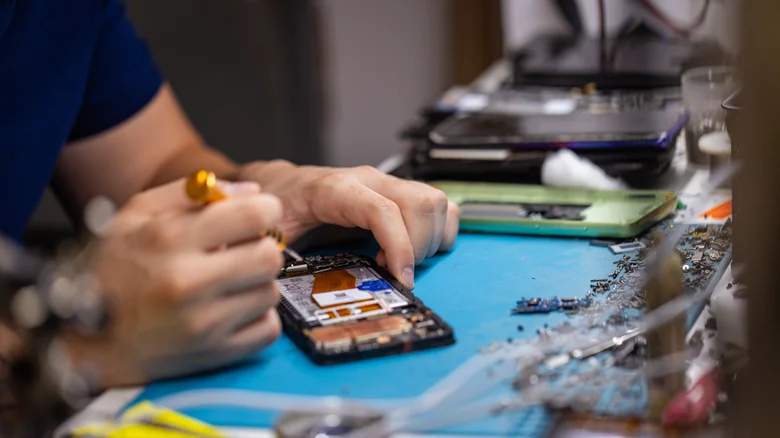
Modern phones, tablets, and even many laptops are built to be thin, light, and visually appealing, which often means they are tightly sealed and difficult to open without specialized tools. This design shift has made do‑it‑yourself repairs more challenging, even as interest in repairability has grown and more people want to extend the usable life of their devices instead of replacing them at the first sign of trouble. Manufacturers are slowly responding: some brands have begun offering official parts, clearer documentation, and design tweaks that make repairs a bit less painful, and high‑profile teardowns have helped consumers understand how the internal layout of devices affects long‑term serviceability. For those willing to attempt a repair, though, there is one critical safety rule that always needs to come first: ensuring the device is not receiving power from any source, especially its battery, before tools ever touch the internal components.
Smartphones and tablets are among the most compact and densely packed consumer electronics products, which makes them particularly delicate to work on. Opening a modern phone might involve heating adhesive, carefully lifting a glass panel, and navigating around stacked boards and ribbon cables tightly wrapped around the battery and other components. In this cramped environment, a single slip with a metal tool, or a moment of inattention around a live battery connector, can cause damage that is far more serious than the original issue you set out to fix. This is why experienced repair technicians emphasize that disconnecting the internal battery is not just a good habit, but a fundamental step in any disassembly procedure that goes beyond swapping an external accessory. Even when a device appears to be powered off, the internal circuit can still carry charge as long as the battery remains connected.
Why disconnecting the battery first matters
When working on a device that runs from an internal battery, it is easy to focus on obvious power sources like wall chargers and forget that the real risk remains inside the chassis. Simply unplugging the power cord or removing a charging cable does not fully eliminate danger if the battery is still feeding current to the circuitry. The moment you expose the internals—whether by lifting off a back panel or removing a display assembly—you are bringing tools, hands, and conductive materials close to live components. If the battery remains connected, a misplaced screwdriver or spudger could accidentally bridge contacts, potentially causing a short circuit, sparks, or permanent component damage.
There is also the matter of personal safety. Lithium‑ion batteries store a significant amount of energy in a compact package, and when they are mishandled, punctured, or shorted, they can overheat or in rare cases catch fire. Disconnecting the battery at the connector cuts power to the board and reduces the likelihood that an accidental slip will lead to arcing or rapid heat buildup on sensitive parts. In devices where the battery connects through a removable cable, it is far safer to detach that connector first and then proceed with any additional disassembly steps, only removing the physical battery later if replacement is actually part of the repair. Throughout the process, it is important to avoid using metal tools directly on or near the battery and to resist the temptation to pry aggressively, as bending or piercing the battery pack can be hazardous.
Keeping the internal power off also protects the electronics you intend to fix. A phone or laptop battery supplies a network of tiny components, from processors and memory chips to power management circuits and small connectors that are not meant to be disturbed while energized. If you start unplugging display ribbons, antenna lines, or storage modules while power is still flowing, you risk inducing shorts or voltage spikes that may damage these parts irreversibly. Even if the device survives the immediate repair, invisible stress on components could shorten their lifespan and lead to mysterious failures later on. Treating “disconnect the battery” as a non‑negotiable early step helps ensure that any work you do afterward occurs on a safe, electrically inert system rather than one that might still be alive in unexpected ways.
General tips for disconnecting a phone battery
Because every phone model is different, the internal layout and the exact procedure for disconnecting the battery vary, and it is always wise to consult a model‑specific guide from a reputable repair source before starting. That said, there are common patterns to look for once the device is open. Most smartphones use one or more flat, rectangular battery cells that take up a large portion of the internal space, typically running along the back of the device. After removing the outer panel and any shields that cover the logic board, you will usually see a small connector—often attached by a ribbon cable—linking the battery to the main board. This connector is your primary target when preparing to work on the phone.
To safely disconnect a phone battery, use a non‑metallic tool such as a plastic spudger or a pair of plastic tweezers to gently pry the connector straight up from its socket. The goal is to separate the connector from the board without flexing or twisting it excessively, which could damage the socket or surrounding components. Once the connector is out, the phone should be electrically isolated from the battery, even if the physical pack is still seated. At this point, it is safer to proceed with tasks like replacing a screen, swapping a charging port, or cleaning internal contacts, as there is no longer a battery actively powering the circuit. If your repair plan includes installing a new battery, you would then follow any adhesive removal steps, very carefully lift the old pack, and only connect the replacement battery at the end of the process.
How to approach battery disconnection in laptops
Laptops, especially modern ones, often offer slightly easier access to internals compared with phones, but they still demand careful planning. Many notebook designs allow you to remove the bottom cover by unscrewing several fasteners and then gently prying along the edges, revealing a relatively spacious internal layout with the battery occupying a large portion of the chassis. In some older or more repair‑friendly models, the battery is a separate module with its own screws and a clearly labeled connector, allowing you to unplug and lift it out with minimal effort. Newer ultra‑thin laptops, however, may adhere the battery to the case or place it partially under other components, making disconnection a bit more involved.
Once the back cover is off, take a moment to identify the battery pack and trace where its cable connects to the main board. Before touching anything, it is a good idea to wear an anti‑static wrist strap grounded to a suitable point, reducing the risk of static discharge that could harm delicate components like RAM or storage chips. When you locate the battery connector, carefully release it—sometimes by gently wiggling a plug out of a socket, other times by flipping a small locking bar or sliding a clip. Only after the connector is fully disengaged should you consider removing the battery pack itself, and even then only if your repair requires it. By disconnecting the battery early, you turn the laptop into an inert platform where you can safely install new memory, replace a fan, clean dust, or service other parts without worrying about power running through exposed circuitry.
Planning safe repairs before you begin
Because the electronics world is filled with thousands of unique phone and laptop models, there is no single universal procedure that can cover every possible device. The best preparation combines understanding general safety principles with checking model‑specific step‑by‑step instructions from trusted resources. Before you start, make sure you have the right tools: precision screwdrivers, plastic prying tools, tweezers, and any special bits required for your particular device. Set up a clean, well‑lit workspace where small screws and components will not get lost, and organize parts as you remove them so reassembly is straightforward.
Most importantly, take time to map out your steps, noting at which point you will disconnect the battery and when it is safe to reconnect it after the repair is complete. Rushing into a repair without this plan often leads to skipped safety steps, especially when a device seems simple to open or when the problem looks trivial at first glance. If at any point you feel unsure about identifying the battery connector, handling an especially stubborn adhesive strip, or navigating around sensitive components, it may be wiser to stop and seek professional assistance rather than risking damage or injury. With the right preparation and a strict commitment to disconnecting the battery first, many repairs become more manageable, safer, and more likely to extend the life of your device instead of cutting it short.


