

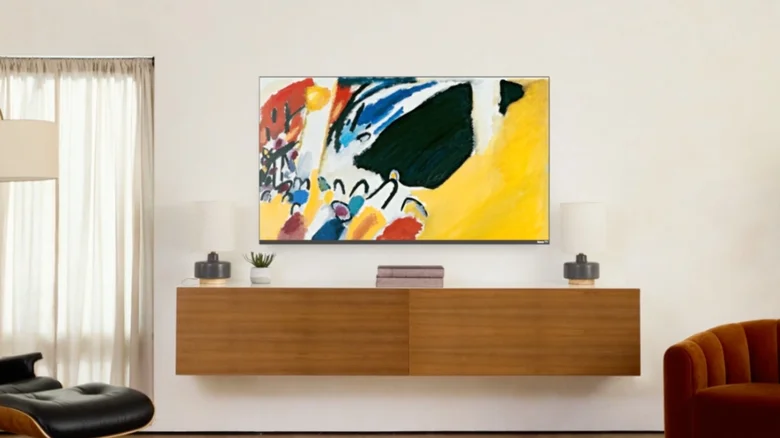
Roku devices are celebrated for their straightforward approach to streaming, providing users with an intuitive gateway to a vast universe of entertainment. Beyond their primary function, however, lies a suite of features designed to personalize the viewing environment itself. While most users are familiar with changing screensavers, Roku offers a more sophisticated aesthetic tool often overlooked: the Roku Backdrops app. This free application transforms your television into a dynamic digital art gallery, allowing you to display curated collections of fine art or your personal photographs when the screen is idle. This feature moves beyond generic animations, offering a way to tailor your living space’s ambiance, showcase cherished memories, or enjoy masterpieces from renowned artists without ever leaving the home screen. Understanding how to install, configure, and maximize this tool can elevate your Roku from a simple streaming box to a centerpiece of personalized home decor.
Installing and Configuring Roku Backdrops
Getting started with Backdrops is as simple as adding any new channel. Navigate to the Streaming Store on your Roku device or use the Roku mobile app to search for “Roku Backdrops” and select “Add Channel.” Once installed, a one-time configuration is required to activate it as your backdrop source. Go to your Roku’s Settings menu, select “Home Screen,” then “Backdrops,” and choose the option to open the Backdrops app. This links the app to your system’s display settings. Inside the Backdrops app, you will find a library of thematic art collections curated by Roku, ranging from classical paintings and modern photography to nature scenes and abstract works. You can select an entire collection to cycle through or choose a single, favorite image to display permanently. For a static image, select your preferred picture and use the “Start Backdrops” command, then navigate to “Backdrop Options” to set the “Image Duration” to “Don’t Change.”
Uploading and Displaying Personal Photos
A particularly engaging feature of Backdrops is the ability to use your own photographs, turning your TV into a digital photo frame for friends and family. The process is designed for convenience using a smartphone. Open the Backdrops app on your Roku and select “Add your photos,” then “Upload photos.” Your TV will display a QR code; scan this code with your phone’s camera to open a dedicated upload portal in your mobile browser. From there, you can select images from your device’s library to create custom albums. The service supports common formats like JPG and PNG and allows for up to 10 albums, each holding a maximum of 100 photos, with batch uploads of 20 images at a time. This creates a rotating showcase of personal memories, perfect for gatherings or adding a warm, personal touch to your room’s atmosphere.
Integrating with Google Photos
For users who manage their photo library in the cloud, Roku Backdrops offers seamless integration with Google Photos. This eliminates the need for manual uploads and ensures your backdrop display is always synchronized with your latest images. To set this up, open the Backdrops app and select “Connect Google Photos.” Your TV will again generate a QR code; scanning it will prompt you to log into your Google account and grant Roku the necessary permissions to access a specified album or your entire photo library. Once connected, any photos you add to the linked Google Photos album will automatically become available in your Backdrops rotation, creating a living, evolving display that updates effortlessly.
Maximizing the Experience on Roku TVs
The Backdrops experience is enhanced significantly on a Roku TV, where the functionality is deeply integrated into the hardware. Owners of Roku-branded televisions can control the Backdrops feature directly with their physical remote. A quick press of the power button will turn on the TV and immediately launch the Backdrops app, presenting your chosen art or photos without first navigating to the home screen. Conversely, a long press of the same button will power the television completely off. This integration makes using Backdrops as a default display mode both effortless and intuitive, encouraging you to enjoy the visual feature as a standard part of your TV’s operation rather than a buried setting.
Creative Uses and Ambient Benefits
The utility of Roku Backdrops extends beyond mere decoration. It can serve as a sophisticated ambient light source, with artful imagery providing soft, changing illumination in a room. For entertainers, it creates an instant conversation piece or a thematic backdrop for parties. In waiting rooms or lobbies, it offers a calming, professional visual element. By thoughtfully selecting collections or personal albums that match your room’s color scheme or desired mood—be it serene landscapes for relaxation or vibrant abstract art for energy—you actively design the visual and emotional space around your television when it’s not in use. This transforms the black mirror of a turned-off screen into a dynamic canvas, ensuring your television contributes to your home’s aesthetic even during downtime.


