

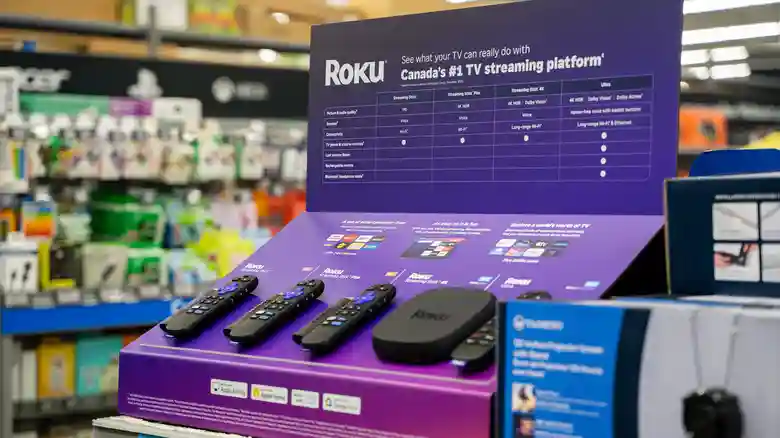
Roku streaming devices have carved a niche in the crowded market by delivering reliable, affordable access to endless entertainment, but whispers of planned obsolescence linger over all consumer electronics. This controversial strategy involves engineering products with artificially limited lifespans to guarantee repeat purchases, whether through physical failure or software barriers. For Roku Sticks, Express models, and Ultra players, the reality proves far more nuanced — these devices demonstrate impressive longevity when properly maintained, often outlasting expectations despite mounting software demands. Rather than malicious design, performance degradation typically stems from legitimate evolution in streaming standards, app complexity, and 4K/8K content requirements that challenge aging hardware.
Real-world usage reveals Roku players averaging four to five years of solid service, with many enthusiasts reporting Roku 3 units from 2013 still functional in 2026 — over a decade of continuous operation. This durability stems from conservative hardware designs prioritizing stability over bleeding-edge specs, coupled with Roku’s commitment to extended software support. Unlike smart TVs abandoned after 2-3 years, standalone Roku devices receive updates for 8-9 years post-launch, maintaining app compatibility and security long after competitors pull support. Proper HDMI port selection, network optimization, and periodic maintenance unlock their full potential.
Average Lifespan and Real-World Performance
Roku Express, Streaming Stick, Ultra, and LT models consistently deliver 4-5 years of optimal performance under normal use, according to aggregated user reports and independent testing. High-demand households streaming 4K content daily or running dozens of apps may notice gradual slowdowns sooner, while casual HD viewers enjoy extended vitality. The second-generation Streaming Stick 4K represents current peak longevity potential, with hardware robust enough for anticipated 8K transitions and processor headroom for mounting app bloat through 2030.
Exceptional cases abound: Roku 2 and 3 models from 2013 remain “updatable” in 2026, receiving security patches despite lacking modern features like Bluetooth audio or voice search. This conservative support philosophy contrasts sharply with smart TV manufacturers abandoning platforms after 24 months. Physical durability impresses too — compact designs resist overheating, and simple internals minimize failure points compared to feature-packed rivals.
Factors Influencing Roku Device Longevity
Software evolution represents the primary aging mechanism, not hardware defects. Roku OS updates introduce 4K optimizations, Dolby Vision, voice controls, and Bluetooth headphone profiles requiring additional processing unavailable on 2015-era chips. Legacy hardware gracefully degrades to essential streaming rather than failing outright, preserving basic functionality. App developers increasingly demand modern APIs, sidelining older models from premium services while free/ad-supported tiers remain accessible.
Environmental factors accelerate decline: HDMI port mismatches cripple 4K/60Hz output, weak Wi-Fi signals cause buffering, and power fluctuations stress internals. Optimal placement — away from heat sources, using HDMI 2.1 ports labeled “4K/120Hz” or “Game” — preserves performance. Ethernet adapters eliminate wireless bottlenecks for Ultra models, while factory resets clear corrupted caches causing interface lag.
Speed-Up Tricks for Aging Roku Devices
When slowdowns emerge, targeted maintenance restores responsiveness without replacement. First, perform a full system restart: Settings > System > Power > System restart bypasses soft locks and refreshes memory. Network troubleshooting via Settings > Network > Check connection resolves DNS issues plaguing older firmware. Disable auto-updates temporarily during peak hours to prevent background stalls: Settings > System > Advanced system settings > Updates > Automatic updates > Manual.
Developer mode unlocks advanced diagnostics: download the Roku Media Player channel, access secret menus via Home x5 > Up x2 > Right x2 > Left x2 > Right. Adjust animation speeds, disable screensavers, and clear channel caches individually. For Streaming Sticks, ensure proper HDMI handshake by power-cycling TV and player simultaneously. These interventions frequently revive 3-4 year old units to near-new condition.
Buying Guide for Maximum Longevity
New purchases in 2026 should prioritize Streaming Stick 4K over budget Express models, offering quad-core processing and micro-USB power for stable 4K/60Hz HDR. Avoid discontinued Roku 3 inventory tempting thrift shoppers — lack of Bluetooth and modern codecs limits futureproofing. Ultra models excel for AV receiver setups with Ethernet and headphone jack, while Stick Plus balances cost and capability.
Roku’s eight-year support commitment exceeds industry norms, but visual media evolution — 8K adoption, AV1 codecs, 120Hz gaming — eventually overwhelms all hardware. HD loyalists enjoy decade-long service; 4K enthusiasts plan 5-year cycles. Accessories like Ethernet adapters, HDMI extenders, and smart plugs enhance stability, while proper HDMI port selection unlocks full bandwidth.
Roku defies planned obsolescence through durable engineering and generous software lifecycles, rewarding patient owners with exceptional value. Current models promise robust service through 2030-2031, outpacing smart TVs and dongles abandoned prematurely. Strategic maintenance and realistic expectations transform “aging” players into enduring entertainment hubs, proving quality persists beyond artificial expiration dates.


