Google Calendar emerges as the ultimate productivity powerhouse hiding in plain sight on every Android device, outlasting trendy to-do apps through seamless integration, psychological time-blocking, and visual burnout prevention. While habit trackers and digital planners crumble under notification overloads, Calendar enforces realistic scheduling by anchoring tasks to finite calendar slots, transforming vague intentions into non-negotiable commitments. Completely free with Gmail/Tasks synergy, it demands no learning curve—productivity experts champion its elegant simplicity over elaborate systems destined for abandonment.
Tasks as Time Blocks
November 2024’s transformative update fuses Google Tasks directly into Calendar, eradicating endless wishlists by mandating time allocation. Tap empty slots, select “Task,” title/describe precisely—”Outline Q1 report: exec summary, KPIs, risks”—repeat daily/weekly for habits. Vague “Work” entries breed paralysis; detailed objectives enable instant execution upon notification.
Psychologically, visibility compels realism: 20 tasks clash visibly against six free hours, forcing prioritization absent in infinite lists. Recurring blocks cement routines—gym 6AM, deep work 9-11AM—compounding into unbreakable habits. Gmail auto-parses events from emails, populating effortlessly.
Color Coding Reveals Bandwidth
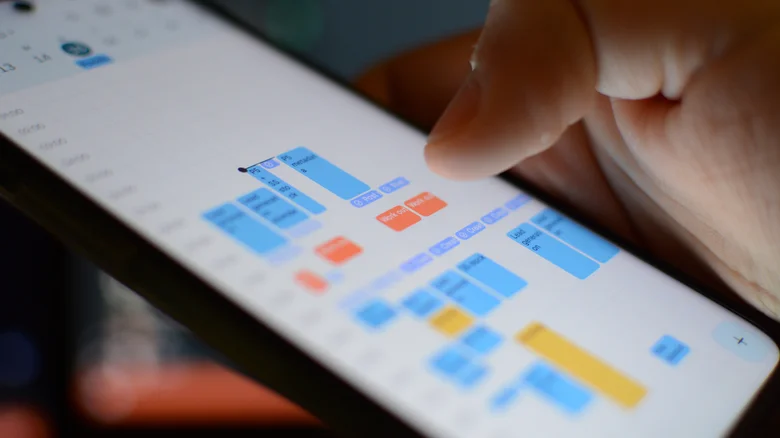
Monochrome calendars mask realities—three-hour coding marathons blend invisibly with 15-minute chats. Assign vivid palettes: fiery red for deep focus (zero interruptions), verdant green for recovery (gym, walks), cautionary yellow meetings, serene blue admin. Week view morphs into heat map—red seas signal overloads pre-burnout.
Settings > Event colors customize per calendar (Work/Personal/Family), auto-applied. Zoomed panoramas expose imbalances instantly: Wednesday’s crimson flood sans green demands reshuffling. Mobile widgets dashboard daily loads; shared family calendars coordinate color clashes.
Overdue Prevention and Focus Modes
Out-of-sight tasks vanish; Calendar’s grid confronts delinquencies daily. Goals feature auto-schedules recurring items optimally—three weekly workouts slot around meetings. Focus Time blocks defend slots from double-bookings, silencing notifications during sacred hours.
Snooze granularity—15min/1hr/1day/tomorrow—defers without guilt. Reminders escalate intelligently; natural language entry parses “Lunch w/ Sarah next Tuesday 1pm.”
Gmail and Ecosystem Synergy
Email flights auto-populate: “Dentist 3/15 2pm” extracts instantly. Tasks integrate natively—checkmark completion syncs everywhere. Meet invites RSVP auto-accept calendars; location pins trigger Maps.
Android widgets surface day-at-glance; Wear OS complications glance-check. Voice entry via Assistant fills spontaneously: “Remind me gym tomorrow 6AM.”
Advanced Hacks for Mastery
Templates via copy-paste recurring structures—weekly reviews, content calendars. Layers distinguish priorities: bold high-impact, italics low-energy. Export ICS shares externally; Zapier automates cross-app flows.
Burnout radar via review rituals: monthly scans reveal patterns—red Fridays demand green buffers. Shared editing enables accountability partners.
Google Calendar proves less-is-more mastery: one app supplants ecosystems through enforced realism, visual diagnostics, effortless integrations. Ditch app chaos—unlock time sovereignty natively, sustainably.