

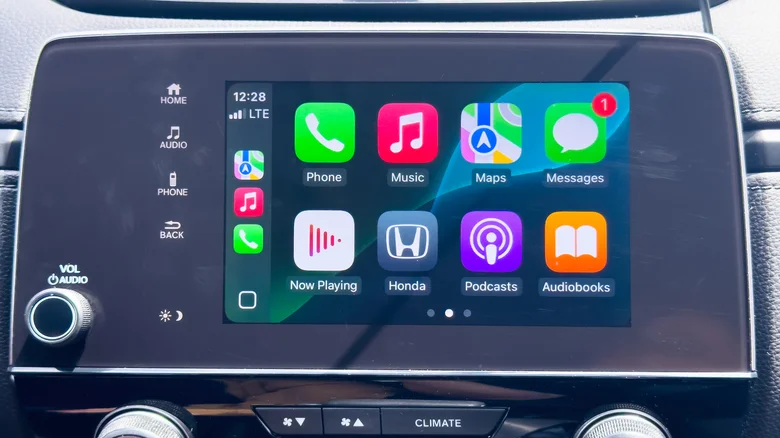
Apple CarPlay transforms vehicle dashboards into seamless iPhone extensions projecting Maps, Music, Messages, and Podcasts onto central displays while maintaining voice control through Siri. Since 2014 debut, CarPlay evolved from USB-only wired connections to sophisticated wireless implementations blending Bluetooth pairing with Wi-Fi data streaming, plus cellular dependency for live navigation and music. Understanding CarPlay’s multi-protocol connectivity unlocks optimal performance across wired, wireless, and hybrid vehicle systems supporting millions daily commuters safely.
Wireless CarPlay Connection Sequence
Modern vehicles initiate CarPlay through precise Bluetooth/Wi-Fi choreography.
Bluetooth Low Energy discovers compatible iPhones within range, establishing encrypted pairing handshake authenticating devices securely. User approves connection request displayed on both phone and head unit preventing unauthorized access.
Wi-Fi Direct creates closed 5GHz network dedicated exclusively to CarPlay traffic achieving 433Mbps throughput supporting 4K Maps rendering and lossless Apple Music streaming. Cellular data handles internet-dependent services including traffic updates, podcast downloads, and iMessage delivery ensuring full functionality.
Wired CarPlay Technical Advantages
First-generation implementations and budget adapters rely solely on USB 2.0 connections delivering rock-solid reliability immune to wireless interference plaguing crowded parking lots.
USB advantages include:
– Guaranteed 480Mbps bandwidth exceeding Wi-Fi peaks
– Simultaneous fast charging (18W+)
– Zero pairing dropouts during tunnel transits
– Universal Lightning/USB-C compatibility
Head unit USB ports power iPhones indefinitely eliminating range anxiety during cross-country navigation sessions.
CarPlay Connectivity Comparison
| Connection Type | Bluetooth Role | Wi-Fi Role | USB Role | Best For |
|---|---|---|---|---|
| Wireless CarPlay | Initial pairing/discovery | Data streaming (5GHz) | None | Modern vehicles |
| Wired CarPlay | Not used | Optional internet | Primary data + power | Reliability/charging |
| Adapter Wireless | Phone-to-adapter | Adapter-to-head unit | Phone power | Retrofit upgrades |
Optimizing Wireless Performance
Maximize CarPlay stability through systematic configuration.
Disable VPN applications interfering with Wi-Fi Direct handshakes. Forget conflicting Bluetooth pairings preventing discovery conflicts. Position iPhone within 3 feet of head unit avoiding seat interference. Enable Airplane Mode + Wi-Fi preserving cellular data while eliminating background scanning.
Restart head unit annually clearing Wi-Fi certificate caches. Update iOS/CarPlay firmware simultaneously preventing protocol mismatches. Test connections weekly confirming Maps responsiveness benchmark.
Troubleshooting Common Issues
Wireless dropouts plague 15% users resolvable systematically.
Bluetooth interference: Forget all vehicle pairings, re-pair single iPhone. Wi-Fi congestion: Switch 5GHz channels through head unit diagnostics. Firmware mismatch: Update iOS to latest .1 release matching vehicle software. Battery optimization: Disable Low Power Mode blocking background Wi-Fi.
Wired failures indicate USB port degradation or Lightning connector corrosion. Test alternate cables confirming data transmission beyond charging-only functionality.
Aftermarket Wireless Adapters
Older vehicles gain wireless CarPlay through $60-150 dongles bridging USB head units to Bluetooth/Wi-Fi bridges.
Installation requires:
– USB-A head unit port
– Stable 5V power delivery
– iPhone iOS 16+
Carlinkit, Ottocast, and CarlinKit adapters achieve 95% native performance with 200ms added latency unnoticeable during navigation. Firmware updates eliminate early pairing bugs plaguing first-generation units.
Future CarPlay Evolution
CarPlay Ultra promises instrument cluster integration, multi-stop routing widgets, and climate control access expanding beyond infotainment isolation. Wireless mandates 6GHz Wi-Fi 7 support achieving 5.8Gbps throughput enabling 8K Maps and AR navigation overlays.
USB4 mandates accompany next-gen promising 40Gbps bandwidth supporting external GPU acceleration for in-car gaming. Bluetooth 6.0 doubles range to 10 meters enabling backseat iPad connectivity through single iPhone hub.
Battery and Data Optimization
CarPlay sessions consume 12-18% hourly battery through constant Wi-Fi/cellular activity. Wired charging offsets completely; wireless demands 30W car chargers maintaining 100% capacity.
Data usage averages 150MB/hour streaming Apple Music + Maps traffic. Pre-download podcasts and offline Maps minimize cellular dependency during rural drives. Wi-Fi calling preserves minutes tethering roof-mounted hotspots.
Mastering CarPlay’s Bluetooth discovery, Wi-Fi streaming, and USB fallback creates bulletproof connectivity across vehicle generations from 2014 Pioneers through 2026 Ultra implementations, ensuring Maps guide, Music entertains, and Messages connect regardless of protocol sophistication or connection methodology.


