

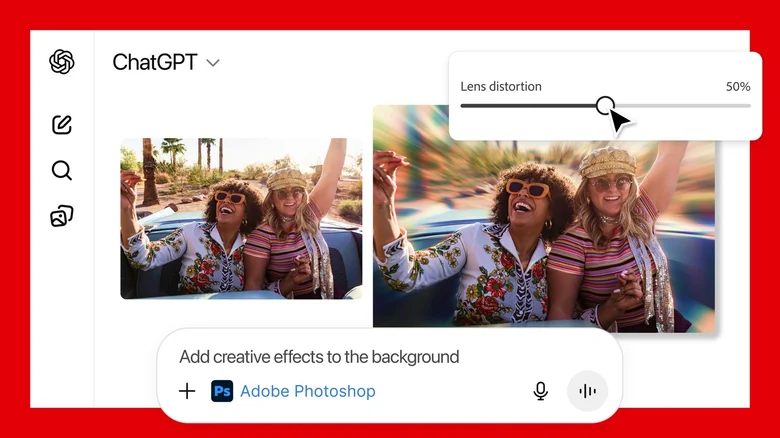
Generative AI chatbots like ChatGPT and Gemini have evolved far beyond simple text responses, challenging the dominance of specialized software from giants like Adobe. These frontier models now generate, edit images, craft infographics, and even process documents with such sophistication that they rival tools like Photoshop or Adobe Express. Users describe edits in plain language—such as “enhance the lighting and remove the background”—and receive professional results instantly, bypassing steep learning curves and subscription fees for niche apps.
Yet Adobe refuses to cede ground, aggressively integrating AI into its ecosystem while forging unexpected alliances. The company’s Firefly models power generative features across Photoshop, Illustrator, and Premiere, with recent AI agents automating complex workflows. Firefly’s openness to third-party models like Gemini’s Nano Banana Pro further blurs lines, enabling seamless hybrid creativity. This proactive stance culminates in Adobe’s bold move: embedding Photoshop, Express, and Acrobat directly into ChatGPT, available for free invocation without leaving the chatbot interface.
Seamless Adobe Integration in ChatGPT
Starting this week, ChatGPT users worldwide can summon these apps via simple prompts, unlocking core editing capabilities without separate logins or payments. Add Photoshop to a conversation with an image, then instruct: “Apply a vintage filter and boost contrast,” watching AI execute adjustments via sliders and effects previews. Adobe Express transforms text ideas into polished graphics—type “design a sleek business card with blue accents”—and iterate through variations conversationally. Acrobat handles PDFs effortlessly: merge documents, redact sensitive data, or extract tables for analysis, all within the chat thread.
- Upload image or PDF to ChatGPT and type “@Photoshop” or “@Adobe Express” in your prompt.
- Describe desired edits like “crop to square, add glowing edges, adjust saturation.”
- Review AI-generated preview and refine with follow-up instructions.
- Download results or seamlessly export to full Adobe apps for advanced tweaks.
- Invoke Acrobat for “summarize this contract” or “combine these three reports.”
This frictionless access democratizes pro tools, letting casual creators produce event flyers, social graphics, or report summaries without software installs. Continuity shines brightest: edits flow bidirectionally to desktop apps, preserving layers and history for pros scaling up projects.
Adobe Apps Pricing and Limitations
Free tiers tempt exploration, but caveats temper expectations. European users face regional blocks on GPT apps, while Android limits to Express only. Functionality caps at essentials—Photoshop skips layer masking or 3D tools, Express omits premium templates, Acrobat excludes e-signatures—nudging power users toward paid suites. Still, these previews suffice for 80% of tasks, building habits that convert to subscriptions.
| App | ChatGPT Features | Full Subscription | Best For |
|---|---|---|---|
| Photoshop | Basic edits, effects, sliders | $22.99/mo (w/ Express) | Image retouching |
| Express | Quick designs, templates | $9.99/mo standalone | Graphics/social |
| Acrobat | Edit, merge, extract PDFs | $12.99/mo | Document workflows |
Bundles sweeten commitments: Photography plan ($19.99) covers Photoshop/Lightroom, Firefly Pro ($19.99) adds web/mobile AI, while Creative Cloud All Apps ($69.99) unlocks everything. Express Premium sneaks into higher tiers at no extra cost. For teams, this ChatGPT gateway serves as a low-risk trial, mirroring Adobe’s freemium web apps that upsell via watermarks.
Strategic Implications for Creatives
Adobe’s ChatGPT embrace neutralizes disruption, turning competitors into distribution channels. Casual users save hundreds yearly by ditching full suites; marketers prototype campaigns mid-conversation; students polish assignments without pirating software. Pros gain rapid ideation—rough a poster in ChatGPT, refine in desktop Photoshop—accelerating pipelines amid AI’s velocity demands.
Rivals like Canva or Figma integrate similarly, but Adobe’s depth endures for precision work. Privacy-conscious creators note on-device processing opt


