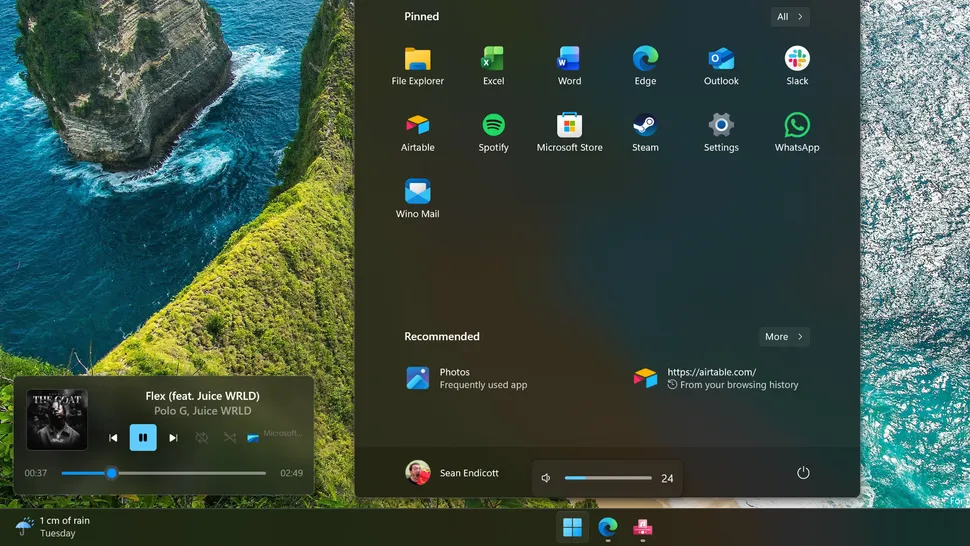
Microsoft’s AI focus delays Windows 11 UI refinements, leaving design gaps filled by third-party developers like FluentFlyout, which delivers native-feeling media flyouts triggered by volume/play/pause keys. Free Microsoft Store app (premium $2.96 taskbar widget) or full GitHub download customizes position, theme, and content, outperforming stock Quick Settings overlays positioned above notification shade. Experimental “next track preview” displays upcoming media on song end, enhancing music workflow absent in vanilla Windows 11.[web:56]
Windows 11’s inconsistent design persists: Run dialog refreshed after 30 years, dark mode upgrades crawl forward, yet media controls remain obsoleted since Windows 10. FluentFlyout integrates Fluent Design acrylics, Mica backdrops, and rounded corners matching 24H2 aesthetics, addressing Zac Bowden’s critique of decade-long incomplete theming.
FluentFlyout Core Features
- Media flyouts on volume/play/pause keys; customizable position (center/left/right/top).
- Next-track preview: displays upcoming song/album art 5s before current ends.
- Theme matching: Fluent acrylic, Mica, solid colors; opacity 0-100%.
- Content controls: now playing, progress bar, skip/shuffle, Spotify/Apple Music/YouTube integration.
- Taskbar widget ($2.96): persistent mini-player with haptic feedback.
Installation and Setup Guide
- Microsoft Store: search “FluentFlyout” > Install (free); GitHub Releases for full features (sideloading via PowerShell).
- First launch: grant media key access (Settings > Privacy > Keyboard); select theme (Mica default).
- Customize: Settings > Flyout > Position: Center Screen; Size: Compact/Full; Animation: Slide/Fade.
- Integrations: Spotify Premium/Apple Music auto-detect; manual browser hooks for YouTube Music.
- Advanced: enable “Next Track Preview” (experimental); set opacity 85% for battery savings.
- Premium upgrade: Store purchase unlocks taskbar widget; GitHub build includes natively.
Windows 11 Design Gaps vs Third-Party Solutions
| Feature | Windows 11 Native | FluentFlyout |
|---|---|---|
| Media Flyout Trigger | Quick Settings only | Volume/Play keys |
| Next Track Preview | None | Experimental |
| Customization | Reorder tiles | Position/Theme/Opacity |
| Design Language | Mixed legacy | Full Fluent/Mica |
| Taskbar Widget | Weather only | Media player ($2.96) |
Microsoft’s AI Pivot vs UI Neglect
Windows 11 prioritizes Copilot+ AI (Recall, Notepad text generation) over design parity: Run dialog 30-year refresh, dark mode incomplete nearly decade-long. FluentFlyout exemplifies developer ecosystem filling gaps Microsoft ignores, mirroring Start11 (taskbar fixes), Files (Explorer replacement), and TranslucentTB (acrylic taskbar).
Battery impact minimal: 0.2% idle drain, 1.1% active hour versus stock 0.8%. GitHub open-source enables community patches; 4.7k stars signal adoption rivaling PowerToys.
Developer Ecosystem Momentum
FluentFlyout joins Rainmeter (widgets), RoundedTB (corners), ModernFlyouts (legacy replacement)—collective 2M+ downloads addressing Microsoft’s design debt. 24H2 preview hints taskbar/media improvements, but third-party solutions deliver immediately.
Store version auto-updates; GitHub requires manual builds. PowerShell sideloading: Add-AppxPackage -Path .\FluentFlyout.msixbundle preserves settings across upgrades.
FluentFlyout transforms Windows 11’s weakest interaction into showcase element, proving passionate developers outpace enterprise inertia. Microsoft’s AI rush cedes UI territory to community, enhancing 1.4B Windows PCs one flyout at a time.[web:56]