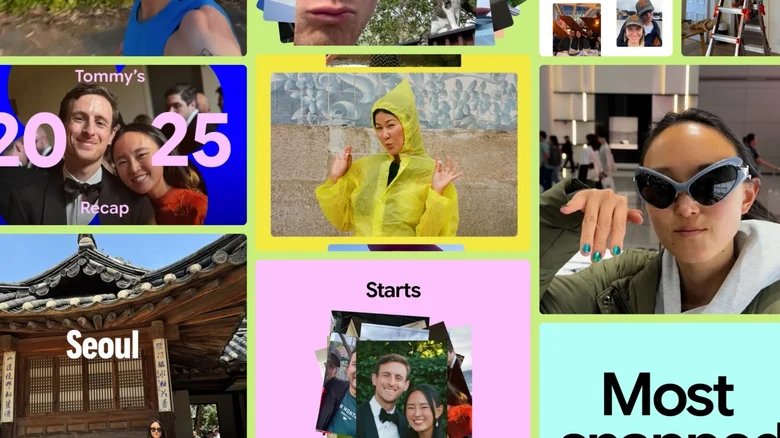
Google has launched Google Photos Recap 2025, a year-end feature that transforms your stored photos and videos into personalized highlight reels. Available throughout December in the Memories carousel, this tool generates fun statistics, animations, and cinematic effects showcasing your 2025 photography journey. From selfie counts to favorite captured faces, Recap delivers engaging insights automatically, with optional Gemini AI enhancements for deeper storytelling in supported regions.
Key Features and Personalization Options
Recap surfaces memorable moments with vibrant graphics, including total photos taken, top people photographed, and new selfie tallies. Users gain unprecedented control through a hide feature, allowing exclusion of specific people or images before regeneration—ensuring privacy and relevance in final outputs. A dedicated carousel at Recap’s end offers shareable short videos and collages, optimized for social media or messaging apps like WhatsApp Status.
Access proves seamless: check the Memories carousel or app top bar, use voice command “Ask Photos to create Recap 2025,” or update to the latest Google Photos version. December-long availability includes related 2025 highlights, extending the nostalgic experience beyond a single viewing.
Gemini AI Integration for Enhanced Storytelling
U.S. users with Gemini enabled in Google Photos experience AI-powered narratives that identify milestones like new roommates or travel adventures from image analysis. This contextual intelligence elevates basic stats into meaningful stories, blending machine learning with personal data for tailored reflections. Animations and effects accompany insights, creating polished video summaries ready for sharing.
The integration demonstrates Google’s push toward multimodal AI in photography apps, where visual content informs narrative generation without manual input. Future expansions may broaden geographic availability and deepen analysis across more memory types.
Creative Editing with CapCut Partnership
A standout addition, “Edit with CapCut,” exports Recap content directly to the popular editing app using exclusive Google Photos templates. Users craft custom highlight reels incorporating music, transitions, and effects before sharing with family ahead of holidays. This collaboration bridges cloud storage with professional-grade mobile editing, empowering non-experts to produce viral-quality videos.
CapCut’s intuitive interface handles exported clips seamlessly, preserving original quality while adding creative flair. Finished creations return effortlessly to Google Photos or export to preferred platforms, maximizing reach during festive seasons.
Accessing and Sharing Your 2025 Recap
Rollout began Wednesday for eligible Android and iOS users, prioritizing recent app updates. Non-carousel appearances at the app’s top ensure discoverability, while voice activation suits hands-free browsing. Shared outputs gain traction through optimized formats for Instagram Reels, TikTok, or group chats, fostering communal reminiscence.
The feature’s month-long presence encourages repeated visits as new highlights emerge, sustaining engagement through year-end. Google’s blog emphasizes broad compatibility, though Gemini features remain region-locked initially.
Why Google Photos Recap Matters
Beyond nostalgia, Recap 2025 underscores evolving cloud photo services: privacy controls address past criticisms, AI personalization differentiates from competitors, and editing partnerships expand utility. For families documenting growth or travelers reliving adventures, it distills terabytes into shareable essence.
As digital memories proliferate, tools like Recap bridge consumption gaps, making reflection effortless. Holiday timing amplifies virality, positioning Google Photos as social storytelling hub. Users worldwide anticipate similar evolutions, blending archival power with creative expression seamlessly.