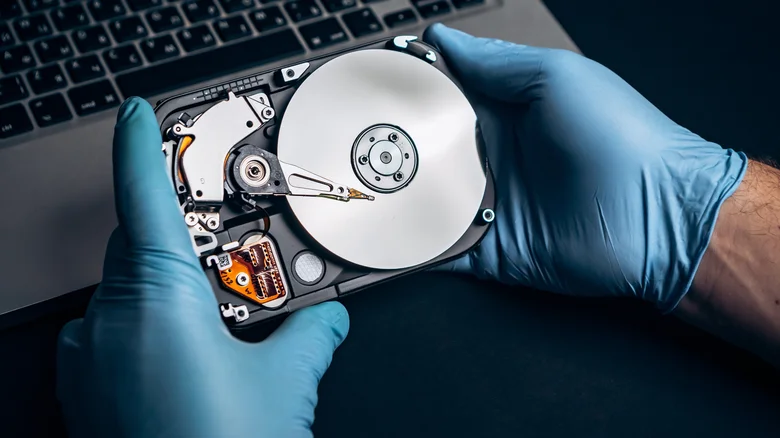
Storage drives—whether high-speed SSDs or reliable HDDs—form the backbone of any PC, holding everything from operating systems to precious files and applications. Many users treat them as maintenance-free components that simply work until they don’t, but this mindset overlooks how daily habits directly impact drive health and longevity. Overheating, dust buildup, power glitches, improper maintenance routines, and neglected updates all silently accelerate wear, leading to data corruption, performance degradation, and outright failure well before the drive’s rated lifespan.
The good news is that most storage-killing mistakes stem from preventable oversights. By adopting a few proactive habits like monitoring temperatures, performing regular cleanings, stabilizing power delivery, and staying current with firmware, you can dramatically extend your drive’s reliable service years. These practices not only safeguard data integrity but also maintain peak performance, ensuring your PC runs smoothly without unexpected crashes or slowdowns that disrupt workflows.
Overheating: The Silent Drive Killer
Excessive heat ranks as the number one enemy of both SSDs and HDDs, triggering accelerated degradation that shortens lifespan by years. SSDs store data as electrical charges in NAND flash cells, and elevated temperatures destabilize these charges, increasing bit error rates and forcing controllers to work overtime on error correction. Sustained operation above 70°C stresses internal components, while modern NVMe drives throttle speeds as a safety measure—prolonged throttling signals deeper thermal damage accumulating over time.
HDDs suffer mechanically from heat, as rising temperatures cause platters, read/write heads, and actuators to expand unevenly, leading to misalignment and surface scratches. Most HDDs maintain optimal health below 55°C; exceeding this threshold invites read errors, bad sectors, and motor strain. Case fans clogged with dust exacerbate the problem by restricting airflow, turning your PC chassis into a heat trap that cooks storage alongside CPUs and GPUs.
Dust Accumulation Traps Heat and Causes Corrosion
Dust acts as an insulator, blanketing heatsinks, fans, and drive casings to choke airflow and raise operating temperatures by 10-20°C. SSDs primarily suffer thermal consequences, but HDDs face compounded risks: fine particles infiltrate vents or seams, coating circuit boards and promoting electrical shorts when combined with humidity. Over years, this corrosion etches traces and connectors, leading to intermittent connectivity or total failure.
Neglected interiors also invite static buildup from debris, discharging unpredictably onto sensitive electronics during vibration or fan spin-up. Regular cleaning—every 3-6 months using compressed air and soft brushes—restores cooling efficiency and prevents particulate damage. Focus on intake fans, GPU blocks, and drive bays, always powering off and grounding yourself to avoid electrostatic discharge.
Power Instability Corrupts Data and Mechanics
Sudden power loss mid-operation devastates storage reliability, interrupting critical processes that leave drives in inconsistent states. SSDs rely on controllers to map logical addresses to physical cells; abrupt shutdowns corrupt these translation tables, orphaning files or bricking entire volumes. Even “completed” writes remain vulnerable milliseconds later, as capacitors discharge and metadata finalizes.
HDDs risk head crashes when platters spin at 7,200 RPM without proper parking sequences, gouging magnetic surfaces and spawning bad sectors. Repeated incidents compound wear on bearings and voice coils. UPS units, quality PSUs with hold-up times exceeding 16ms, and OS hibernate modes provide essential buffers against outages, preserving drive health during storms or grid flickers.
Defragmentation: Helpful for HDDs, Harmful for SSDs
Traditional defragmentation shines for HDDs by consolidating scattered files, minimizing seek times as heads travel shorter distances across platters. Occasional runs—once monthly—boost sequential access speeds by 20-50% on fragmented volumes. However, excessive defragging generates unnecessary mechanical stress, heat from constant head movement, and wear on aging media.
SSDs render defragmentation obsolete and destructive, as native TRIM commands and over-provisioning handle wear-leveling internally without physical seeks. Manual defrags trigger pointless read/write cycles, exhausting limited program/erase cycles on flash cells (typically 3,000-100,000 per cell depending on TLC/QLC tier). Modern OSes like Windows automatically optimize SSDs via scheduled TRIM instead, preserving endurance without user intervention.
Firmware Neglect Leaves Drives Vulnerable
Firmware serves as each drive’s operating system, orchestrating garbage collection, error correction, vibration compensation, and thermal throttling. Outdated versions harbor bugs that mishandle edge cases, leading to silent data corruption or inefficient block allocation that accelerates wear. SSD firmware updates often introduce superior wear-leveling algorithms, boosting endurance by 20-30% while fixing controller hangs.
HDD firmware refinements improve spin-up reliability, head parking during idle, and acoustic management to reduce neighbor noise complaints. Quarterly checks via manufacturer tools (Samsung Magician, Crucial Storage Executive, SeaTools) ensure drives run optimized code, often unlocking performance tweaks or monitoring enhancements absent in stock versions.
SSD vs HDD Maintenance Comparison
| Issue | SSD Impact | HDD Impact | Prevention Priority |
|---|---|---|---|
| Overheating | Charge leakage, throttling | Mechanical expansion, misalignment | High |
| Dust Buildup | Thermal throttling only | Corrosion, shorts, head issues | Medium-High |
| Power Loss | Table corruption, bricking | Head crashes, bad sectors | High |
| Defragmentation | Wear acceleration (avoid) | Performance boost (moderate use) | Medium |
| Firmware Updates | Endurance + stability gains | Mechanical optimization | High |
Essential Habits for Drive Longevity
- Monitor temperatures with tools like HWMonitor or CrystalDiskInfo; aim for SSDs under 60°C and HDDs under 50°C during load.
- Clean PC interiors every 3-6 months using compressed air; focus on fans, heatsinks, and drive bays while powered off.
- Install a UPS rated for your PSU wattage to handle outages lasting 5-10 minutes, enabling safe shutdowns.
- Disable defragmentation schedules for SSDs in Windows Optimize Drives; enable for HDDs but limit to monthly.
- Check firmware monthly via manufacturer apps; apply updates during low-usage periods with full backups ready.
- Maintain 20-25% free space on drives to support wear-leveling and garbage collection algorithms.
- Use SMART monitoring dashboards to track reallocated sectors, error rates, and remaining lifespan estimates.
Building a Resilient Storage Strategy
Proactive maintenance transforms fragile storage into battle-tested reliability, sidestepping the frustration of surprise failures during critical tasks. Combining thermal vigilance, physical upkeep, power safeguards, and software optimizations ensures drives deliver their full TBW or MTBF ratings. Regular health checks via built-in tools reveal issues early, allowing graceful migrations before catastrophe strikes.
Ultimately, treating storage as a dynamic system rather than static hardware unlocks years of extra service while protecting irreplaceable data. These habits benefit entire PC ecosystems, reducing component stress across the board and yielding smoother, quieter operation over time.