

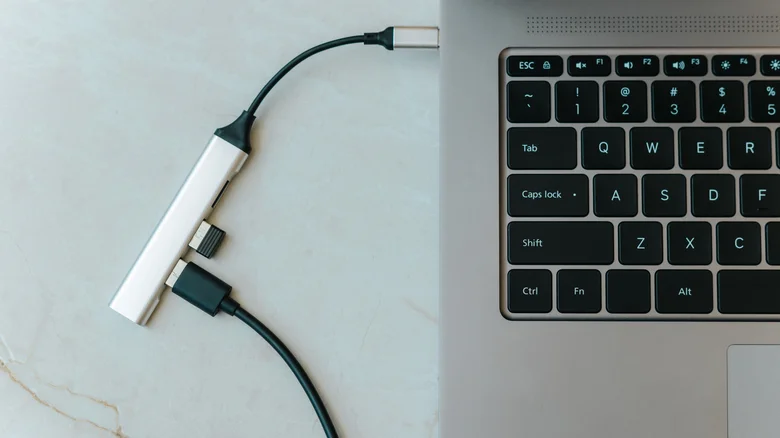
USB ports power the backbone of modern computing, connecting everything from mice to high-speed SSDs across desktops, laptops, phones, and tablets. Visually identical despite vast performance gaps, these ports range from legacy USB 2.0 at 480Mbps to blazing USB4/Thunderbolt 4 exceeding 40Gbps, differentiated mainly by color—black for 2.0, blue for 3.x, red/teal for Gen 2×2. Mismatching devices throttles speeds, limits functionality, and wastes bandwidth, underscoring the need for strategic port allocation in crowded setups.
Limited ports demand prioritization: reserve fastest lanes for bandwidth hogs like external drives or capture cards, relegating low-demand peripherals like keyboards to slower slots. USB hubs expand capacity affordably, but chaining through suboptimal upstream ports cascades bottlenecks. Backward compatibility ensures universality, yet optimal pairing unlocks full potential, transforming workflows from frustrating to fluid.
Optimal USB Port Allocation Guide
Identify ports via icons, colors, or System Information: USB 3.2 Gen 2×2 (20Gbps, teal/red) tops USB-A charts, while USB4/Thunderbolt 4 USB-C reigns supreme at 40Gbps+. Test speeds with tools like CrystalDiskMark to baseline performance. Hubs like Anker’s shine with dedicated data/charge lanes, but anchor them to Gen 2×2 for downstream benefits.
- Scan Device Manager or About This Mac for port specs and speeds.
- Plug high-bandwidth devices into blue/teal USB 3.x/4 first.
- Use extensions sparingly; direct connections minimize signal loss.
- Enable USB Power Delivery for charging on data ports.
- Update chipset drivers for full protocol support.
Device-Specific Port Recommendations
| Device | Ideal Port | Min Port | Why It Matters |
|---|---|---|---|
| Computer Mouse | USB 2.0 (black) | USB 2.0 | Low polling rate; latency irrelevant |
| USB Hub | USB 3.2 Gen 2×2 (20Gbps) | USB 3.0 | Preserves downstream bandwidth |
| Capture Card (Elgato 4K) | USB 3.2 Gen 2×2 | USB 3.0 | 4K/144Hz uncompressed capture |
| External SSD | USB4/Thunderbolt 4 | USB 3.2 Gen 2 | 5GB/s+ transfers; RAID arrays |
| Mirrorless Camera Webcam | USB 3.2 Gen 2 | USB 3.0 | 4K/60fps stable bitrate |
Gaming Mice and Wireless Optimization
Advanced mice pack RGB, 8KHz polling, and macros, yet thrive on USB 2.0—Logitech G305’s dongle demands minimal juice. Wireless setups minimize latency via close-range dongles or extensions positioning receivers millimeters from sensors. Wired esports mice benefit marginally from USB 3.0 polling stability, but differences prove negligible in blind tests.
Capture Cards and Storage Demands
Elgato HD60 X mandates USB 3.0 baselines for 1080p/60, escalating to Gen 2×2 for 4K passthrough sans artifacts. Higher bitrates yield buttery footage ideal for YouTube editing, where compression masks drop frames. External storage mirrors this: NVMe enclosures hit 2800MB/s on USB 3.2 Gen 2×2, crawling at USB 2.0’s 35MB/s—hours for 1TB transfers. Laptops lean heavily on these, with 30TB portables rivaling internal RAID.
Mirrorless cameras as 4K webcams demand USB 3.0+ to sustain high-bitrate feeds; Sony a6700 or DJI Osmo Pocket 3 stutter on slower ports, forcing resolution drops. Paired with capture cards, they enable pro streams indistinguishable from dedicated rigs.
Strategic allocation scales setups: cluster peripherals via powered hubs on Gen 2×2 trunks, daisy-chaining Thunderbolt docks for 6+ high-speed devices. Cable quality matters—certified 3.2 cables prevent negotiation failures. macOS users enable “High Power Mode” in Energy Saver; Windows tweaks Power Management to avert sleep-induced drops. This discipline elevates everyday computing, ensuring SSDs scream, streams sparkle, and mice track flawlessly without port wars derailing productivity.


