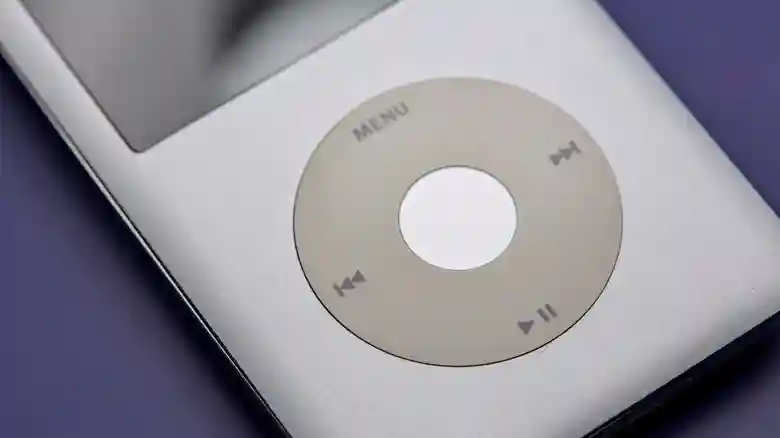
Apple’s iPod Classic emerged as a revolutionary force in the early 2000s, transforming how millions experienced music and igniting a digital revolution. With its sleek design and intuitive click wheel, it made portable music libraries a reality, allowing users to carry thousands of songs in their pocket. People eagerly ripped CDs, purchased tracks from iTunes, or sourced files from peer-to-peer networks like LimeWire. This era defined personal audio consumption, shifting it from bulky players to compact, high-capacity devices. Even as the iPhone debuted in 2007, followed by streaming giants like Spotify and seamless integrations with Apple Watch and AirPods, the iPod’s legacy endured.
Though streaming dominates today, the iPod Classic refuses to fade into obscurity. Apple discontinued the iPod Touch in 2022, leaving it on iOS 15.8, yet these devices retain surprising vitality. Whether you own a vintage iPod Classic, Nano, Shuffle, or the final Touch model, creative repurposing keeps them relevant. They offer a nostalgic escape from smartphone overload, delivering distraction-free music playback and more. Dust off that old player—it’s far from obsolete.
Use It as Your Daily Music Companion
Transform your iPod into your primary music device for an authentic, retro listening experience. If subscriptions don’t appeal and you hoard CDs or iTunes libraries spanning decades, sync it effortlessly with a modern Mac. Load up albums from the ’90s grunge era or recent indie discoveries, then pair with classic wired headphones for pure immersion. The tactile click wheel evokes fond memories, stripping away notifications and apps that plague phones.
For iPod Classic enthusiasts, particularly the fifth-generation model, hardware upgrades breathe new life. Replace the aging battery with a high-capacity lithium-ion unit for all-day playtime. Swap the mechanical hard drive for a speedy SSD, boosting capacity to terabytes and eliminating skip-prone spinning disks. Skilled modders can even retrofit a USB-C port, ditching the outdated 30-pin connector. Services like specialized iPod modding shops offer comprehensive kits, including AirTag-style trackers for locating lost devices and even Taptic Engine feedback for modern haptics. Suddenly, your relic rivals contemporary gadgets.
Extend its utility to your car as a dedicated stereo source. Dock a Classic or Touch via aux cable or Bluetooth adapter, piping tunes through speakers without phone distractions. This setup curbs the urge to check emails at stoplights, promoting safer drives and focused journeys. Gym-goers and runners appreciate the lightweight profile, free from bulky smartphones weighing down pockets.
Repurpose as a Portable Hard Drive
Beyond music, an iPod Classic doubles as a versatile portable drive, leveraging its built-in storage. Apple officially supports this on Classics, Nanos, and Shuffles with available space. Transfer files between Macs and PCs seamlessly—ideal for job presentations, college essays, vacation photos, or video clips. It’s a budget-friendly alternative to buying dedicated USB drives, especially if your player boasts 160GB or more.
Upgrading to an SSD amplifies this potential, enabling lightning-fast transfers and massive storage. Setup is straightforward: connect via USB, launch iTunes (or Finder on newer macOS), select your device, navigate to Summary, and enable “Disk Use.” Drag and drop files like any external drive. Speeds may not match cutting-edge SSDs, but for occasional transfers, it’s impressively practical. Safeguard data with backups, as these aging units aren’t infallible.
Maximize the iPod Touch’s Lasting Features
The seventh-generation iPod Touch, Apple’s swan song for the line, caps at iOS 15.8 but punches above its weight. Stream Apple Music or store local MP3/AAC files, enjoying them via Lightning-wired or Bluetooth headphones. FaceTime video calls and iMessage texting work flawlessly with Wi-Fi, perfect for quick chats without a phone.
App compatibility varies, but gems persist. Apple TV streams shows natively, while Safari accesses Netflix, Prime Video, and YouTube—workarounds for iOS 16 requirements. Dive into ebooks and PDFs via Apple Books, or surf endlessly on Safari. Performance lags on intensive tasks, but for light use, it’s snappy. Gift one to kids for safe media consumption, limiting exposure to social media pitfalls.
Recycle Responsibly or Donate Thoughtfully
When revival efforts fall short, Apple’s free recycling program awaits. Mail in any iPod model—they responsibly dismantle components, recovering rare earth metals and reducing e-waste. Trade-ins rarely yield credit for Classics, but recycling safeguards the planet. Third-party recyclers or resellers offer alternatives, though Apple’s process ensures data erasure.
Prefer passing it on? Donate to schools, charities, or family for educational tools or nostalgic playback. Vintage markets thrive on retro tech, with collectors snapping up modded Classics. In a hyper-connected world, these devices champion digital minimalism—pure music, storage, and simplicity without endless pings. Your iPod Classic isn’t history; it’s a timeless tool ready for rediscovery.